
It’s the last Thursday of the month. You’ve got three clients, a shared inbox you’ve been living in since 7am, two calendars you rebuilt after someone double-booked a dentist and a board meeting, and a nagging feeling that you owe everyone an invoice. You open a note where you’ve been jotting hours, squint at “Tues – emails + that travel thing,” and realize you have no idea whether that was 40 minutes or two hours.
Sound familiar? Billing is the part of virtual assistant work nobody warns you about. You’re brilliant at keeping other people organized, and then your own admin becomes the thing that slips. This guide walks through a virtual assistant invoice template you can actually reuse, the rates VAs charge across common services, and how to handle the messy stuff: retainers, per-task jobs, and clients who pay in a currency that isn’t yours.
Why VA Billing Gets Messy
The trouble isn’t that VAs are bad at invoicing. It’s that the work fights back.
Your hours are scattered. A developer bills in focused blocks. You bill in fragments: six minutes here rescheduling a call, twenty there chasing a supplier, an hour building a slide deck. If you’re not logging as you go, the day evaporates and you undercharge to be safe. Undercharging quietly, every month, adds up to real money.
Every client wants something different. One’s on a monthly retainer. One pays hourly and questions anything over 40 hours. One drops “quick tasks” into Slack that are never quick. Trying to remember which billing model applies to whom, at the end of the month, is how mistakes happen.
Scope creep is invisible until invoice day. The retainer was 20 hours of inbox and calendar. Somewhere in week two it also became travel booking, then light bookkeeping, then “can you just handle the newsletter?” None of it felt big in the moment. All of it is billable, and if your invoice doesn’t show it, the client never learns what they’re actually using.
Then you have to chase. You did the work, sent the invoice, and now it’s day 21 of net 15 and you’re rewriting the same polite email for the third time. Awkward, especially when you talk to this person daily.
And some clients are overseas. Different currency, different bank rails, a timezone where your “payment due” lands at their 2am. International work is great for your rate ceiling and rough on your cash flow if the invoice doesn’t spell out exactly how to pay.
None of this means you need accounting software. It means your invoice needs to do more work so you don’t have to.
What Belongs on a Virtual Assistant Invoice
A good VA invoice answers three questions before the client can ask them: what did you do, what does it cost, and how do I pay you. Here’s the checklist:
- Your business name and contact (and business number or tax ID if you have one)
- Client name and contact
- Invoice number and issue date
- Billing period the invoice covers (huge for retainers and hourly work)
- Itemized lines with a clear description, quantity or hours, rate, and amount
- Subtotal, any tax, and total due
- Payment terms (net 15, net 30, due on receipt)
- Payment instructions with your actual details: bank transfer, PayPal, or Wise, written out as text the client can act on
- A short thank-you or note if it fits your voice
That payment-instructions line matters more than people think. Your invoice doesn’t collect money for you. It tells the client precisely where to send it. For international clients especially, listing your Wise or bank details as plain text removes the “how do I even pay this” delay.
Sample Line Items
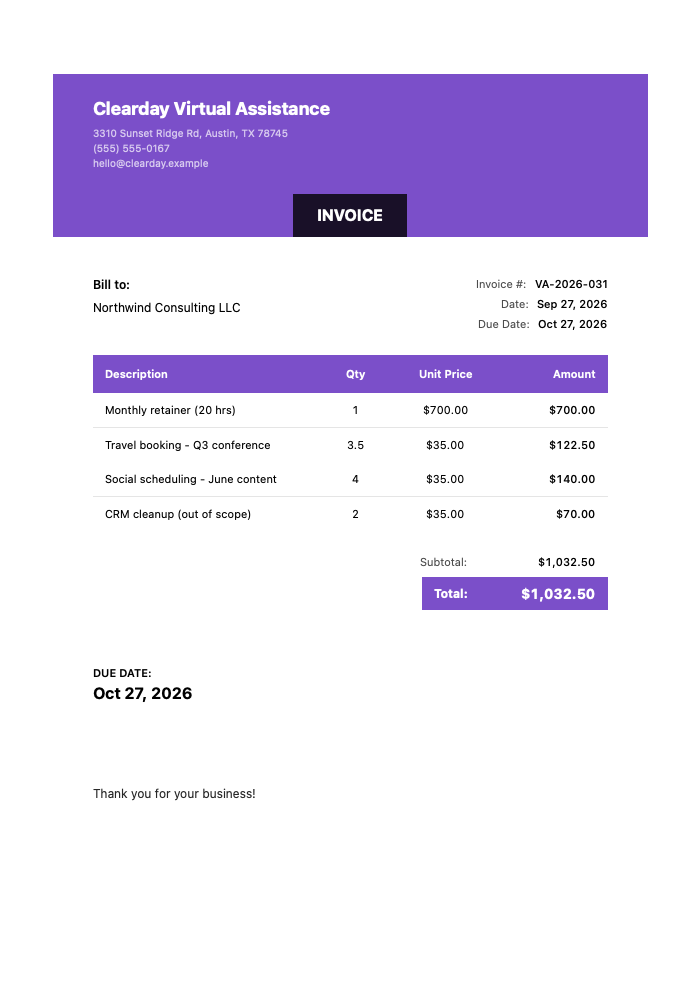
Here’s what a clean itemized section looks like for a hybrid month, part retainer, part extra work:
Click to view full size
The 20-hour inbox and calendar retainer is a flat $700.00, and the extra work is billed by the hour at $35.00: 3.5 hours of travel booking for a Q3 conference, 4 hours of June social media scheduling, and 2 hours of CRM cleanup, for a total of $1,032.50 with no tax. State your terms (net 15 here) and payment details alongside it.
Notice the “(out of scope)” tag on the CRM work. That’s you gently teaching the client that the retainer has edges, without sending a confrontational email about it.
Typical VA Rates by Service
Rates vary a lot. Where you live, how specialized the task is, how long you’ve done it, and whether the client is a solo founder or a funded startup all move the number. Treat the ranges below as a starting sketch, not gospel, and adjust up as you gain experience.
| VA Service | Typical Hourly | Package / Monthly Range |
|---|---|---|
| Inbox / email management | $20–$45 | $300–$800 |
| Calendar & scheduling | $20–$40 | $250–$700 |
| Travel booking | $25–$50 | Per-trip $75–$250 |
| Data entry | $18–$30 | $200–$500 |
| Social media scheduling | $25–$50 | $300–$900 |
| Bookkeeping support (data entry, not accounting) | $25–$50 | $350–$900 |
| Customer support / help desk | $20–$40 | $400–$1,200 |
| Project coordination | $30–$60 | $600–$1,500 |
| Transcription | $20–$35 | Per-audio-hour $60–$120 |
| Research & lead sourcing | $25–$50 | Per-project $150–$600 |
| Content / newsletter formatting | $25–$45 | $250–$700 |
| Light graphic tasks (Canva) | $25–$45 | Per-asset $15–$60 |
Two notes. First, “bookkeeping support” here means data entry and receipt wrangling, not doing anyone’s books. Second, if a task takes real skill (project coordination, research that needs judgment), charge for the skill, not the keystrokes.
Three Ways to Bill, and When to Use Each
Most VAs end up using all three across their client roster. The trick is picking the right one per relationship.
Hourly. You track time and bill for what you actually work. Best for new clients, unpredictable workloads, or anyone whose “quick tasks” have a habit of ballooning. The upside is fairness. The downside is a soft ceiling: you can only work so many hours, and clients sometimes watch the clock instead of valuing the outcome. If you go hourly, log time the moment you start a task. Reconstructing a week from memory always costs you money.
Retainer / package. The client pays a fixed amount for a set block of hours or a defined scope each month, say, 20 hours of inbox and calendar for $700. Retainers are the dream for cash flow because you know what’s coming. They also demand boundaries. Define what’s included, what counts as overflow, and what your overflow rate is. When month three quietly turns into 28 hours of work, your invoice should show the extra 8 as a separate line so the conversation about upgrading the package happens naturally.
Per-task. You quote a flat price for a defined deliverable: “set up the webinar, $150,” “clean and dedupe the CRM, $200.” Great for one-off projects and clients who hate hourly ambiguity. The risk is underquoting a task that turns out to be a swamp. Scope it tightly in writing, and if it grows, quote the addition rather than eating it.
A quick gut check: predictable, ongoing work leans retainer. Variable or new relationships lean hourly. Contained deliverables lean per-task. If you’re weighing these against real cash-flow tradeoffs, these payment terms are worth a read before you lock anything in.
Handling International Clients
Billing someone in another country isn’t hard, but it has a few sharp corners.
Pick a currency and state it clearly on the invoice, USD 1,032.50, not just $1,032.50, since half a dozen countries use a dollar sign. Decide up front who eats the transfer fees; Wise is popular with VAs because the fees are low and predictable, and you can list your Wise details right on the invoice. Watch your timezones when you set “due” dates, and don’t be shy about asking a deposit from a first-time overseas client, because chasing a late payment across borders is genuinely harder. If this is becoming a regular part of your business, the complete guide to invoicing international clients covers the tax and currency details properly.
Making the Invoice Fast
Here’s the thing about the checklist above: it’s a lot to rebuild from a blank page every month, per client. That’s exactly the friction that makes you put billing off until Thursday-at-7pm panic. This is where InvoiceZap fits, since it’s built to knock an invoice out from your phone in about 30 seconds, between other tasks, without opening a laptop.
With InvoiceZap the workflow is simple. You save a client, pick a professional template, drop in your line items, and add your payment instructions once, so your Wise or PayPal details ride along on every invoice automatically. It’s mobile-first, which suits how VAs actually work: in short gaps, on the go, not at a dedicated billing station. You mark invoices paid yourself as the money lands, so you always know who still owes you without any external account linked. There’s a 3-day full trial to see whether it fits your rhythm before you commit.
Fast invoicing also fixes the chasing problem indirectly. When you invoice the moment work wraps, instead of batching it all to month-end, payments start arriving sooner and more evenly. If you still hit slow payers, keep a couple of follow-up email templates ready so the nudge takes ten seconds and stays friendly. And if you want a broader look at the tools freelancers reach for, this rundown of invoicing software for freelancers is a good comparison point.
Want a structured starting layout with hours and rates already mapped out? The consulting invoice template is close to a VA’s needs, with time-tracking and retainer sections you can adapt line for line.
Wrapping Up
Your value as a VA is making chaos manageable for other people. Your invoice should do the same for you: capture every billable minute, show clients what they’re actually using, and tell them exactly how to pay. Get the template right once, decide your billing model per client, and the last-Thursday panic just stops happening.
When you’re ready to stop rebuilding invoices from scratch, download InvoiceZap and send your next one in about 30 seconds. Start the 3-day trial, bill your clients tonight, and get back to the work you’re good at.
Frequently Asked Questions
Should virtual assistants bill hourly or on retainer?
It depends on the client. Use hourly for new or unpredictable relationships where the workload swings week to week, and retainers for steady, ongoing clients so your income is predictable. Many VAs run both across their roster and add a per-task rate for one-off projects.
How much should a virtual assistant charge?
Common rates run roughly $18 to $60 per hour depending on the task, your experience, and your location. Specialized work like project coordination or research sits at the higher end, while data entry sits lower. Rates vary widely, so treat published ranges as a starting point and raise yours as your skills and results grow.
Should I ask for a deposit or upfront payment?
For per-task projects and first-time clients, yes. A 25 to 50 percent deposit protects your time and filters out clients who won’t pay. For established retainer clients, billing at the start of the month (rather than the end) accomplishes something similar and smooths your cash flow.
How do I get paid by international clients?
List clear payment instructions on the invoice with your bank, PayPal, or Wise details written as text, and state the currency explicitly. Wise is popular with VAs for low, predictable fees. Ask overseas first-timers for a deposit, since chasing late cross-border payments is harder than local ones.
How do I track my hours across multiple clients?
Log time the moment you start a task rather than reconstructing your week from memory, which almost always shortchanges you. Keep a separate running tally per client, then transfer those hours straight onto each invoice at billing time so nothing gets missed or double-counted.
Ready to Streamline Your Invoicing?
Create professional invoices in 30 seconds with InvoiceZap's mobile-first design. No sign-up required.
Try InvoiceZap FreeTags: