
You just wrapped a two-day commercial shoot. The gimbal’s back in the case, the drone batteries are charging, and your director of photography already left. The client loved the dailies. Now they’re waiting on a bill for the deposit balance and the shoot days before you sit down to edit.
So you open a blank doc and stall. How do you split the deposit from the balance? Where does the licensing fee go? Is the second shooter a separate line or rolled in? What about the color grade and the two revision rounds you promised?
A vague invoice costs you money. Roll editing, drone footage, and usage rights into one lump “video production” line and clients start negotiating the whole number down. Break it out properly and you get paid for every deliverable you produced. This guide covers what belongs on a videography invoice, realistic US rate ranges, the three billing models most video shooters use, and the deposit-and-balance workflow that keeps you from handing over final files unpaid.
Why videography invoicing is its own beast
Video work doesn’t bill like most freelance gigs. A copywriter delivers a doc and sends one invoice. You’re juggling a pre-production quote, a deposit before anyone shows up on set, shoot days that may run over, a post-production timeline measured in weeks, and licensing terms that can be worth more than the shoot itself. Each of those is a moment where money leaks.
Quoting complex projects. A wedding film, a startup’s brand video, and a real estate walkthrough share almost no cost structure. One’s a full-day event with a second shooter and a same-day highlight reel. One’s a scripted shoot with talent, lighting, and three rounds of notes. One’s a 90-minute drone-and-gimbal job with a 48-hour turnaround. Quote any of them off a single day rate and you’ll either underprice your time or scare the client off.
Deposits before the shoot. You’re blocking a date, often turning down other work, and sometimes renting gear or paying a crew before the client pays a cent. A deposit protects you, but it has to be tracked cleanly so the final invoice credits it correctly, or you’ll spend an awkward email thread explaining why the balance looks high.
Licensing and usage rights confusion. This is the one that trips up newer videographers. A local business that wants a video for its website is buying a different license than a brand that wants to run your footage as a paid national ad for two years. Same shoot day, wildly different value. If you don’t spell usage rights out as a line item, clients assume they bought unlimited rights forever, and you’ve given away the most valuable part of the job for free.
Revision scope. “Just a few tweaks” is how a two-round edit turns into a six-week ordeal. Without a defined number of revision rounds on the invoice, every new comment is a change you’re expected to make for free.
Kill fees. Shoots get cancelled. Talent drops out, weather kills the drone day, a client reorganizes. If your terms don’t cover a kill fee, a last-minute cancellation costs you a blocked date and the prep you already did.
Getting paid before you hand over final files. The single most important rule in video: your deliverables are your only bargaining chip. Once the client has the 4K masters, a certain type of client stops feeling any urgency to pay. Structure billing so the final balance clears before the download link goes out.
If you’ve read our photography invoice template, a lot of this rhymes. Video just adds more moving parts, longer timelines, and licensing stakes that are usually higher.
What goes on a videography invoice
Start with the basics every invoice needs, then layer the video-specific pieces on top.
The standard stuff:
- A sequential invoice number (VID-2026-018)
- Issue date and a clear due date
- Your business name, contact info, and tax ID if you have one
- Client name and billing contact
- Project name and shoot date(s)
- Payment instructions (how they actually pay you)
The video-specific pieces:
- Itemized deliverables so the client sees shoot, edit, and extras separately
- Deposit credit shown as a line that subtracts from the total
- Usage rights / licensing written out as its own line with defined scope
- Revision rounds included, and the rate for anything beyond that
- Delivery format and timeline (resolution, file format, delivery method)
A sample line-item invoice
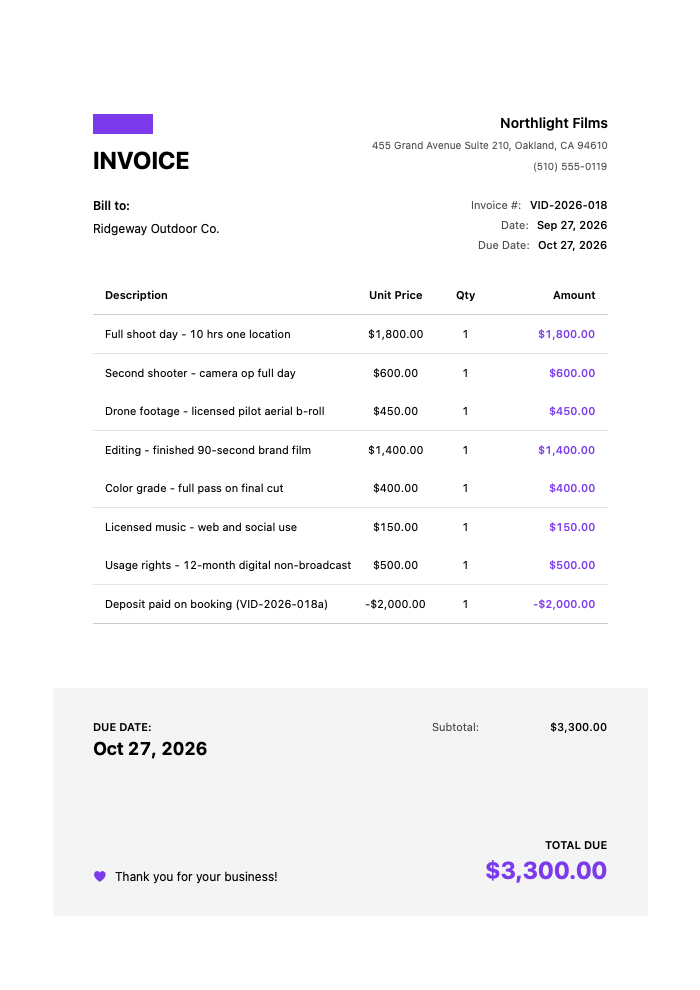
Here’s what a real project invoice looks like for a mid-size brand video. Note the deposit sitting as a credit line at the bottom.
Click to view full size
The client already paid the $2,000 deposit when they booked. This final invoice shows the full $5,300 value of the work, credits what they’ve paid, and lands on a clean $3,300 balance. Nobody’s confused, and every deliverable you produced has a number attached to it.
A rate table you can actually use
Rates vary a lot by market, experience, and niche. A wedding videographer in a small town and a commercial shooter in Los Angeles aren’t on the same scale. Use these as a starting framework, not gospel.
| Service | Typical US range | Notes |
|---|---|---|
| Half-day rate (up to 5 hrs) | $500 – $1,200 | One videographer, one camera |
| Full-day rate (up to 10 hrs) | $900 – $2,500 | Overtime billed hourly after |
| Wedding package | $2,500 – $6,500 | Coverage + highlight film + full edit |
| Editing (per hour) | $50 – $150 | For open-ended or hourly post work |
| Editing (per finished minute) | $75 – $300 | Common for branded/social content |
| Drone add-on | $300 – $700 | Requires licensed pilot |
| Second shooter | $400 – $900/day | Second camera op |
| Color grading | $250 – $600 | Full grade on final cut |
| Licensing / usage rights | $300 – $2,000+ | Scales with reach and duration |
| Rush delivery | +25% to +100% | For compressed turnarounds |
| Additional revision round | $150 – $500 | Beyond included rounds |
These ranges are illustrative, not benchmarks. Your rates should reflect your market, experience, gear, and the specific deliverables. Research local comps before you quote.
Billing models: pick the one that fits the job
Package pricing works best when the deliverables are well-defined and repeatable. Weddings, real estate tours, and social content bundles fit here. The client sees one clear number, you protect your margin by defining exactly what’s included, and there’s no clock-watching. The risk: scope creep. Define the coverage hours, revision rounds, and deliverables tightly or the package eats your profit.
Day-rate pricing suits commercial and event work where the scope is set by time on set. You charge a half-day or full-day rate, bill overtime hourly, and list post-production separately. It’s clean and easy for clients who think in shoot days. Just be explicit about what the day rate covers and where overtime kicks in.
Hourly billing is the honest choice for open-ended editing, ongoing content retainers, or projects where the scope genuinely can’t be pinned down. It ensures you’re paid for every hour, but clients dislike open meters, so cap it with an estimate. Our guide on writing estimates that win jobs covers how to present an hourly range without scaring anyone off.
Most working videographers mix these. Package for the shoot, hourly for revisions past the included rounds, day-rate for the extra shoot day the client added. That’s normal.
The deposit-and-balance workflow
This is the backbone of getting paid in video, so treat it as a system, not an afterthought.
- Quote the full project before anyone commits. Break out the deliverables so the client understands what they’re buying.
- Invoice the deposit once they say yes, usually 30–50% of the total. Nothing goes on the calendar until it clears. This retainer covers your blocked date and any prep or crew costs.
- Shoot and edit. If the project runs long or the client adds a shoot day, note the extra as a separate line for the final bill.
- Send the final invoice showing the full project value with the deposit credited as a line item, exactly like the sample table above.
- Deliver final files once the balance clears. Watermarked previews or a lower-res proof are fine before payment. The 4K masters go out after.
That last step is non-negotiable for most shooters. Your deliverables are the one thing keeping the client motivated to pay, and you give that up the moment you hand over the final download. Setting clear payment terms that get you paid faster on the invoice, Net 14 with a due date, reinforces the whole workflow.
Treat usage rights as a line item, always
Say it plainly on the invoice. A usage rights line should define: exclusive or non-exclusive, which channels (web, social, broadcast, paid ads), geographic scope, and duration. “12-month digital, non-broadcast, US only” tells the client exactly what they bought. If they later want to run your video as a national TV spot or extend the license another two years, that’s a new line and new money.
Videographers who skip this hand away the most valuable asset they produce. A shoot day is a shoot day, but a broadcast license with national reach for two years can be worth more than the entire production. Charge for it separately, or you’re giving it away.
Building these invoices fast on your phone
Typing all this into a fresh document after every shoot is exactly the kind of admin that eats your evening. This is where a mobile invoice app earns its keep. InvoiceZap is built for exactly this: create a clean, itemized invoice on your iPhone in about 30 seconds, right from the back of the van before you’ve even packed the sandbags.
The deposit-and-balance flow maps directly onto how the app works. You create the deposit invoice when the client books, then a separate final invoice that lists the full scope and credits the deposit, the same structure as the sample table above. Because it’s mobile-first, you can send the deposit request from the parking lot the moment a client confirms, instead of waiting until you’re back at the desk.
One thing to be clear about so you set it up right: InvoiceZap doesn’t process card payments or hold your deposit, and there’s no Apple Pay or payment link inside the invoice. What it does is let you put your own payment instructions on the invoice, whatever you already use to get paid, so the client knows where to send the deposit and the balance. You mark each invoice paid manually once the money lands. For video work that’s genuinely useful, because you always know whether the deposit cleared before you show up and whether the balance cleared before you release the masters.
The professional templates handle the presentation so your invoice looks like it came from a production company, not a Notes app. If you’re weighing tools, our roundup of invoicing software for freelancers puts it in context, and for overseas clients the international invoicing guide covers currency and tax notes.
Grab a ready-made video editing invoice template to see the structure laid out, then rebuild it in the app for repeat use.
Bring it home
Videography billing isn’t hard once you stop treating the invoice as an afterthought and start treating it as part of the production. Break out your deliverables. Charge a deposit before you block the date. Put usage rights on their own line and define the scope. Pin down revision rounds. And never let final files leave your hands before the balance clears.
Do that consistently and two things happen: you get paid for the full value of what you produce, and clients treat you like the professional operation you are. The videographers who struggle to make a living aren’t usually the ones with the worst reels. They’re the ones with the fuzziest invoices.
Ready to stop dreading the post-shoot paperwork? Download InvoiceZap and start your 3-day trial. Send your deposit invoice from set, credit it cleanly on the final bill, and get back to doing what you actually love, which is making video and not chasing money.
Frequently Asked Questions
How much deposit should a videographer charge before a shoot?
Most videographers charge a 30–50% deposit to book a project, and nothing goes on the calendar until it clears. The deposit covers your blocked date, any gear rental or crew you pay in advance, and pre-production time. For larger commercial projects, a milestone structure works well: 50% to book, then the balance on delivery. For weddings and events where you’re turning down other work for that date, closer to 50% is standard. Always show the deposit as a credited line on the final invoice so the client sees exactly what they’ve already paid.
Should I bill videography by day-rate or as a package?
It depends on the job. Package pricing works best for well-defined, repeatable deliverables like weddings, real estate tours, or social content bundles, where the client wants one clear number and you protect margin by defining the scope tightly. Day-rate pricing suits commercial and event work where the scope is set by hours on set; you bill a half-day or full-day rate plus overtime, and list post-production separately. Many videographers mix both, packaging the shoot while day-rating an added shoot day and billing revisions hourly. Choose the model that makes the scope clearest for that specific client.
How do I bill for licensing and usage rights on a video invoice?
List usage rights as their own line item, separate from the shoot and editing. Define four things: exclusive or non-exclusive, which channels are covered (web, social, broadcast, paid ads), geographic scope, and duration. A line like “12-month digital, non-broadcast, US only” tells the client exactly what they bought. Price it based on reach and length of use, since a national broadcast license for two years can be worth more than the production itself. If the client later wants broader usage or a longer term, that’s a new line and new money, not a favor.
How many revision rounds should I include, and how do I charge for extra ones?
Two revision rounds is a common standard for video projects. State the included number directly on the invoice and define what counts as a “round” versus a brand-new concept or re-edit. Revisions beyond the included rounds should be billed at a set per-round fee or your hourly rate, listed as a separate line. This keeps “just a few tweaks” from turning into weeks of unpaid work, and it gives the client a clear, fair path to request more changes when they genuinely need them.
How do I make sure I get paid before delivering final files?
Structure the billing so the final balance clears before the download link goes out. Your deliverables are the one thing keeping the client motivated to pay, and you give that up the moment they have the 4K masters. Send watermarked previews or a lower-resolution proof so they can approve the edit, then release the final files only after payment lands. Setting a clear due date with Net 14 terms and marking the invoice paid the moment the money arrives keeps this clean, so you always know whether the balance cleared before you hit send on the masters.
Related Templates:
Ready to Streamline Your Invoicing?
Create professional invoices in 30 seconds with InvoiceZap's mobile-first design. No sign-up required.
Try InvoiceZap FreeTags: