
It’s the 30th of the month and you have five retainers to bill. The salon brand on Instagram and TikTok. The SaaS client whose ad spend you fronted this month. The restaurant group where you added a reel package on top of the retainer. A real estate agent on a three-month project. And the fitness studio that always pays two weeks late, so you already know how that one goes.
You built all of it. Grids, captions, community replies at 9pm, an ad budget you babysat daily. Now you have to turn a month of scattered work into five invoices that are clear enough to get approved on the first pass. If your billing is a mess, this is the night it costs you.
Most social media managers lose money here, not on the work. Fuzzy line items, ad spend tangled up with your fee, add-ons nobody wrote down. This guide fixes that with a social media manager invoice template you can reuse every month, plus a rate table so you can sanity-check what you charge.
Why SMM Invoicing Trips People Up
Social media billing is messier than most freelance niches for a few specific reasons.
Retainer scope is fuzzy. “Social media management” means one thing to you and another to the client. You scoped 12 posts and daily community management. They think it also covers a full video shoot and a Q4 strategy deck. If the invoice doesn’t spell out what the retainer includes, every extra request feels free to them and unpaid to you.
Ad spend gets confused with your fee. This is the big one. A client sees “Facebook Ads - $2,400” on your invoice and panics, thinking that’s your charge. Actually $2,000 is their ad budget passing through you to Meta, and $400 is your management fee. Blur those two numbers and you get a nervous email every single month.
Add-ons pile up. A retainer starts clean, then someone asks for an extra reel, a giveaway graphic, a last-minute story series before a launch. Small stuff, individually. By month’s end it’s real hours you either bill or eat.
Late payers are the norm. Marketing budgets get “reviewed,” approvals sit in someone’s inbox, and you’re the one carrying the gap, especially if you fronted ad money. Weak payment terms make it worse.
You’re selling something invisible. There’s no product in a box. A vague invoice makes clients quietly wonder what they’re paying for. A detailed one reminds them, every month, exactly how much you do.
None of this needs fancy software. It needs structure you repeat.
What Goes on a Social Media Manager Invoice
The bones are the same as any professional invoice, with a few SMM-specific must-haves.
Standard fields
- Your business name, contact info, and logo
- Client name and billing contact (get the person who actually approves invoices, not just your day-to-day contact)
- Invoice number and issue date
- Billing period, for example “June 1–30” for a retainer
- Line items with clear descriptions and amounts
- Subtotal, any tax, and total due
- Payment terms and due date
- How to pay: bank transfer details, PayPal, or Wise, written as plain text
The SMM-specific parts
- The retainer described as an included-services list, not a mystery lump sum
- Ad management fee kept on its own line, separate from spend
- Ad spend reimbursement clearly labeled as a pass-through, not your income
- Add-ons itemized so scope creep becomes billable line items
- The platforms and period covered, so there’s no “wait, which month is this?”
Sample Invoice: Retainer + Ads + Add-On
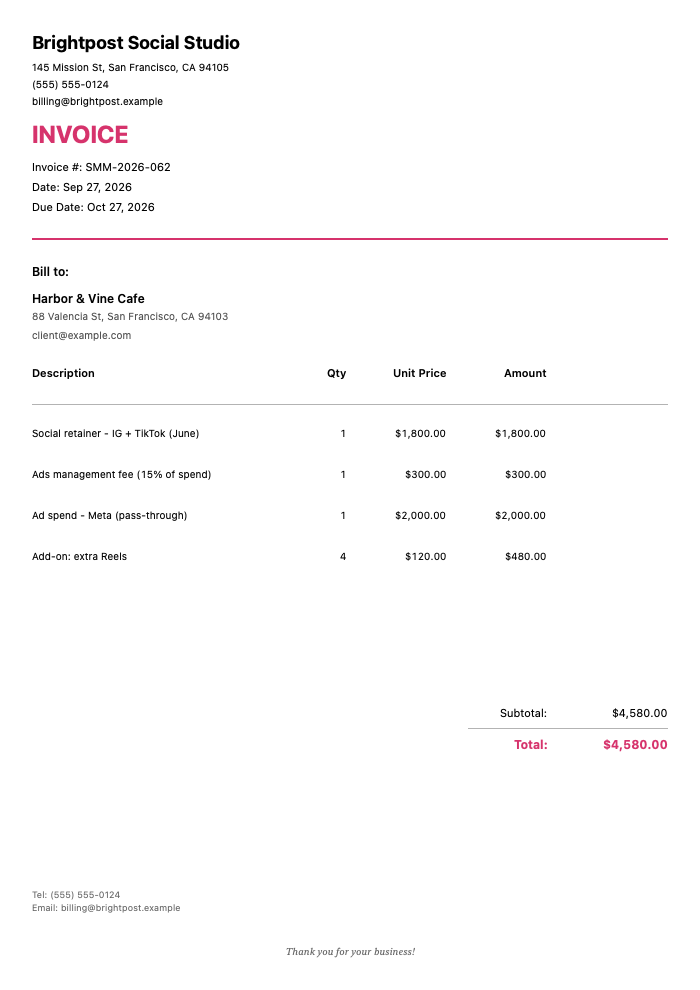
Here’s what a month looks like for a mid-size client. Notice how the ad management fee and the actual ad spend sit on separate lines.
Click to view full size
The $1,800.00 retainer covers Instagram and TikTok for June: 16 feed posts, 12 stories, daily community management, and a monthly report. The $300.00 ads management fee is 15% of the $2,000.00 Meta spend, which sits on its own pass-through line, and the four extra scripted and edited Reels are $120.00 each, for a total due of $4,580.00 on Net 14 terms.
Two things make this invoice work. The ad spend line says “pass-through” in plain language, so nobody mistakes $2,000 for your fee. And the add-on reels are their own line, which quietly documents that they were outside the retainer, in case anyone asks later.
If you’d rather not front the ad budget at all, don’t. Have the client put their card directly on the ad account and drop the reimbursement line entirely. Your invoice then shows only the $300 management fee against their spend. Cleaner, and no cash-flow risk for you.
Social Media Manager Rate Table
Rates swing hard based on your experience, the client’s size, and how niche your specialty is. The ranges below reflect typical US freelance pricing so you have a starting point, not a rule.
| Service | Typical US Range | Common Billing Basis |
|---|---|---|
| Monthly management retainer (per platform) | $500–$1,500 / platform / mo | Monthly retainer |
| Content creation & graphics | $50–$150 / graphic or $75–$150 / hr | Per asset or hourly |
| Short-form video editing (Reels/TikTok) | $75–$250 / video | Per video |
| Community management | $300–$1,000 / mo | Monthly, often bundled |
| Paid ads management | 10%–20% of ad spend (min $250–$500/mo) | % of spend or flat |
| Strategy / account audit | $500–$2,500 | Project or one-time |
| Analytics & monthly reporting | $150–$500 / mo | Monthly, often bundled |
| Influencer / UGC coordination | $250–$1,000 / campaign | Per campaign |
| Content shoot / photography day | $600–$2,000 / day | Day rate |
| Caption & copywriting | $25–$75 / caption | Per asset |
| Hourly consulting / training | $75–$200 / hr | Hourly |
| Account setup / onboarding | $300–$1,500 | One-time |
These figures are general market observations for planning purposes, not financial advice or a benchmark you should match. Price for your market, your experience, and the value you deliver.
A quick note on the ads management percentage. Charging 10%–20% of spend works fine until a client’s budget is small, at which point 15% of $800 doesn’t cover the hours. That’s why most SMMs set a floor, something like “15% of spend or $400/month, whichever is greater.” Put that floor in your contract and on your invoice so it never becomes an argument.
Three Billing Models, and When to Use Each
Most social media managers land on one of three structures. Plenty of people run all three across different clients.
Monthly retainer. You charge a fixed fee for a defined scope every month. This is the bread and butter of SMM work because social is ongoing, not one-and-done. Retainers give you predictable income and give the client predictable cost. The catch is scope discipline: write down exactly what’s included, and bill add-ons when requests go past it.
Per-project / campaign. A flat fee for a defined deliverable, like a product launch campaign, a giveaway, or a content shoot with a set number of assets. Good for one-off work, new clients who aren’t ready to commit to a retainer, or seasonal pushes. Scope and deliverables need to be airtight, because “project” invites “can you just also…”
Performance / hybrid. A base fee plus a bonus tied to results, or a base plus a percentage of ad-driven revenue. This can pay well when you have real influence over outcomes and clean attribution. It also carries risk, since you’re partly betting on things outside your control (the offer, the product, the client’s sales team). Most people use it as a hybrid: a solid retainer base so your rent is covered, with a performance kicker on top.
For deeper agency-style billing patterns, the marketing consultant invoice template covers retainers and performance fees in more detail, and a lot of it maps straight onto social work.
Handling Client Ad Spend vs. Your Fee
This deserves its own section because it’s where SMMs get burned most.
Your management fee is your income. Ad spend is the client’s money that happens to flow through your account (or doesn’t). Keep them mentally and physically separate.
You’ve got two clean options:
- Client pays the platform directly. Their card sits on the ad account. You never touch the money. Your invoice shows only your management fee. Zero cash-flow risk, zero confusion. This is the better default, especially with new clients.
- You front the spend and get reimbursed. Sometimes necessary, for example when a client can’t or won’t put a card on the account. If you do this, put the reimbursement on its own labeled line, bill it fast, and consider requiring the ad budget upfront before you spend a cent. Fronting five figures of someone else’s ad money on Net 30 terms is how freelancers go broke while “profitable.”
Whichever you pick, spell it out in the contract before month one. Ad spend surprises poison client relationships faster than almost anything.
Clear, upfront payment terms do a lot of the heavy lifting here. If you’re not sure what to put on the invoice, these payment terms are built to get you paid faster, and they apply cleanly to retainer work.
Billing Five Retainers Without Losing Your Evening
Back to the 30th of the month. Five clients, similar-but-not-identical invoices, and you’d like to be done before midnight.
The thing about retainer invoicing is that last month’s invoice is 90% of this month’s invoice. Same client, same base scope, mostly the same numbers. The only things that change are the billing period, the ad spend figure, and whatever add-ons landed this month. So the fast way to bill isn’t to build each invoice from scratch. It’s to copy the last one and tweak three fields.
That’s exactly the workflow InvoiceZap is built around. It’s a mobile-first iOS app for making professional invoices in about 30 seconds, and its duplicate feature is what makes recurring-style retainer billing painless. You save June’s invoice for a client, then in July you duplicate it, change the dates, update the ad spend line, add any extra reels, and send. Fair warning so you scope this correctly: it does not do automated recurring billing, so nothing fires off on its own. You duplicate and send each month. In practice that’s a couple of minutes per client, and you stay in control of every number before it goes out.
Here’s the end-of-month routine:
- Duplicate last month’s invoice for each client
- Update the billing period, ad spend / management fee, and the total
- Add any add-on line items from the month (that extra reel package, the giveaway graphic)
- Check the payment instructions are current — your bank transfer, PayPal, or Wise details go on as plain text, since the app doesn’t process payments or run payment links
- Send and log it
Because everything is on your phone, you can knock out all five while the coffee’s still hot. Try InvoiceZap free for 3 days — the trial is the full app, so you can build a real retainer invoice, save it, and test the duplicate flow before you commit.
A few things worth knowing so your expectations are right. Payment tracking is manual: you mark an invoice paid when the money actually lands, which for retainer work is honestly fine since you’re watching your bank feed anyway. There are no automated reminders, so late-payer follow-ups are on you. Good news is a short, friendly nudge does most of the work, and you can borrow wording from these follow-up email templates instead of writing one from scratch each time.
If you want a pre-built starting point rather than building from a blank invoice, grab the marketing invoice template and adapt the line items to your social services.
Want to compare tools before you decide? This roundup of the best invoicing software for freelancers lays out the trade-offs without the marketing fluff.
Frequently Asked Questions
Should I bill social media clients on retainer or per project?
Retainer for anything ongoing, which is most social work. Social media isn’t a one-time deliverable; it’s a monthly grind of posting, engaging, and optimizing, so a recurring monthly fee matches the reality and keeps your income predictable. Use per-project pricing for defined one-offs like a launch campaign, a content shoot, or a strategy audit, or as a low-commitment way to start with a new client before moving them onto a retainer.
How do I bill a client for ad spend versus my management fee?
Keep them on separate lines and label them clearly. Your management fee (a flat amount or a percentage of spend) is your income. The ad budget is the client’s money. The cleanest setup is having the client put their own card on the ad account so you never touch the budget and only invoice your fee. If you have to front the spend, put it on its own line marked as a reimbursement or pass-through, bill it quickly, and consider requiring the budget upfront so you’re not financing their ads.
How much should a freelance social media manager charge?
It depends on your experience, the client’s size, and your niche, but common US ranges run roughly $500–$1,500 per platform per month for a management retainer, 10%–20% of ad spend for paid ads management (with a monthly minimum), and $75–$200 an hour for consulting. Bundle services into a monthly retainer once a client needs steady support, price add-ons like extra videos separately, and set a floor on percentage-based ad fees so small budgets still cover your time.
Should I ask for a deposit or upfront payment on the first month?
Yes, especially with new clients. A common approach is billing the first month’s retainer upfront before work starts, which protects you during the riskiest part of any new relationship. If you’re going to front ad spend, require that budget upfront too, non-negotiable. Once a client has a track record of paying on time, you can relax into billing at the start of each service period.
What can I do about clients who pay late?
Prevent most of it with tight terms and a short cycle: shorter windows like Net 7 or Net 14 for retainers, the first month billed upfront, and payment instructions printed right on the invoice. When someone still slips, a quick, friendly follow-up the day after the due date clears up most cases, since it’s usually an oversight, not a refusal. For repeat offenders, consider pausing work until the balance clears and, going forward, requiring payment before the month’s content goes live.
The Bottom Line
Your billing shouldn’t be the hardest part of your month. The work is the hard part. Invoicing is just admin, and admin should be fast, clear, and repeatable.
Nail three things and you’re most of the way there. Describe the retainer as a real list of included services so clients see the value. Keep ad spend on its own labeled line so it never gets mistaken for your fee. Itemize add-ons so scope creep turns into revenue instead of resentment. Do that, and your invoices get approved on the first pass and paid closer to on time.
Then make it repeatable. Build one strong retainer invoice, and every month after is a copy-and-tweak, not a rebuild. Download InvoiceZap and start your 3-day trial to build your first retainer invoice on your phone, then duplicate it next month and get back to the work that actually pays.
Related Reading:
Ready to Streamline Your Invoicing?
Create professional invoices in 30 seconds with InvoiceZap's mobile-first design. No sign-up required.
Try InvoiceZap FreeTags: