
You’ve just finished a perimeter treatment. The tank’s back in the truck, you’ve knocked down two active wasp nests the homeowner didn’t even know about, and you’ve flagged some carpenter ant activity near the deck for a follow-up. The customer walks out and asks the question every tech hears: “So what do I owe you today?”
Now you’re standing on the driveway doing math in your head. Was this the quarterly plan visit or a one-time call? Did you charge for the wasp nests separately? What products did you apply, and did you write down the EPA registration number in case they ask? If your answer is a handwritten receipt or a promise to “send something over later,” you’re leaving money and professionalism on the lawn.
A clean pest control invoice fixes all of that. It shows exactly what you treated, what you applied, and what it costs, so you get paid before you pull out of the driveway. This guide walks through what belongs on a pest control invoice, real rate ranges for the services you actually sell, and how to handle the messy part of this trade: billing recurring plans and one-time calls from the same truck.
Why Pest Control Billing Is Its Own Headache
Most trades bill one job and move on. Pest control doesn’t work that way. You’re juggling several billing models at once, and each one has its own quirks.
Recurring plans that never look identical. A quarterly general pest customer pays the same plan rate every visit, right up until the visit they don’t. You find a rodent burrow under the shed, or they ask you to knock down a hornet nest while you’re there. Now that “flat” recurring invoice needs an add-on line, and if you forget to add it, you ate the cost.
License and chemical disclosure. You’re applying restricted-use and general-use pesticides on someone’s property. Many states expect your applicator license number on the paperwork, and a growing number of commercial clients, property managers, and health inspectors want a record of exactly what product went down, at what concentration, and where. A vague “sprayed for bugs” line doesn’t cut it.
Tracking who’s on what plan. One customer is on a monthly commercial contract. Another is quarterly residential. A third called once for bed bugs and will never call again. Keeping their pricing, service history, and target pests straight in your head is a recipe for undercharging.
Getting paid on-site. Homeowners are home when you treat. That’s your best shot at payment. But if you can’t hand them an invoice on the spot, “I’ll mail a check” turns into a 45-day chase. The right payment terms and follow-up habits make a real difference here, and it starts with putting a clear invoice in their hands before you leave.
What Goes on a Pest Control Invoice
A pest control invoice has a few line items no other trade needs. Skip them and you look like a guy with a sprayer. Include them and you look like a licensed professional running a real business.
Business and license information
[Company Name]
Pest Control & Extermination Services
[Address, City, State ZIP]
Phone: [Number] | Email: [Email]

Applicator License #: [Your state license number]
EPA Est. / Business Reg #: [If required in your state]
Your applicator or operator license number belongs right in the header. It reassures the customer and, in many states, it’s flat-out required on service documents.
Service and site details
- Service date and arrival window
- Technician name
- Service address (and billing address if commercial and different)
- Plan or contract ID for recurring customers
- PO number for commercial accounts
Target pests
Spell out what you treated for. “General pest,” “German roach,” “subterranean termite,” “bed bug,” “Argentine ant,” “rodent.” This protects you in a dispute and makes your warranty language mean something.
Chemicals and products applied
This is the line that separates pros from amateurs. For each material, list:
- Product name (for example, Termidor SC, Temprid FX, Advion Gel)
- EPA registration number
- Target area (perimeter, interior cracks and crevices, attic, exterior eaves)
- Rate or dilution if commercial or regulated
Warranty and re-service note
Pest control lives and dies on the re-service promise. Put it in writing:
RE-SERVICE GUARANTEE
Covered pests returning between scheduled visits
are re-treated at no charge. Just call and we'll
come back out. Guarantee applies to plan customers
and treatments within the stated warranty window.
Sample line-item invoice
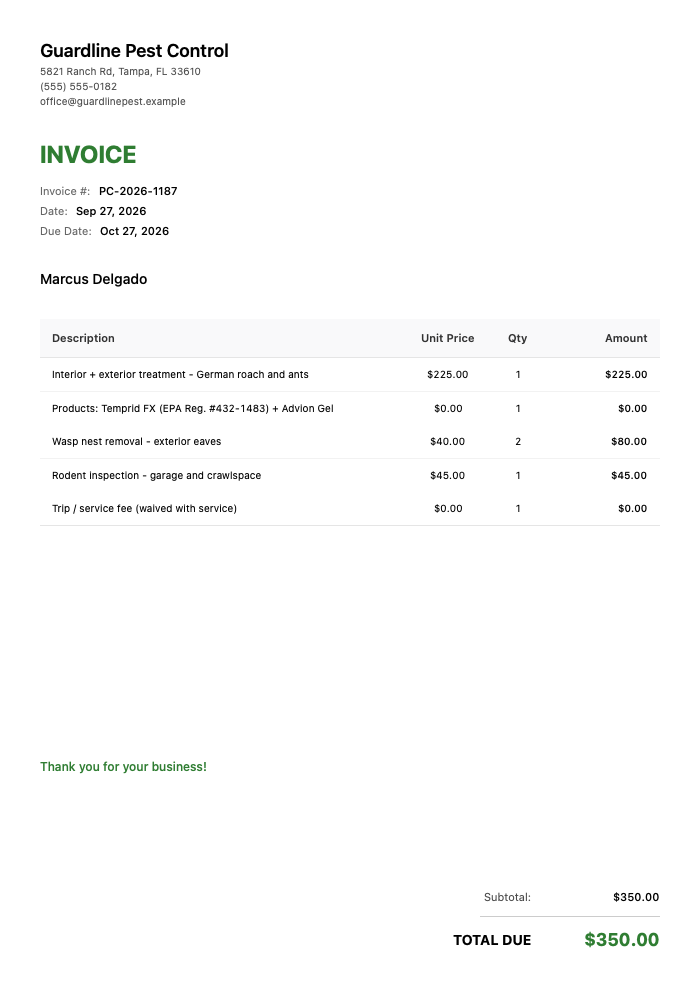
Here’s how a typical residential one-time call actually lays out:
Click to view full size
The treatment ($225.00), two wasp nests at $40.00 each ($80.00), and the rodent inspection ($45.00) come to $350.00, due on completion. The products line and the trip fee show $0.00: the materials are included in the treatment price, and the call-out fee is waived with service. Add sales tax only if your state requires it on pest services.
Notice the product line sits right under the service it belongs to, with the EPA registration number attached. That single detail makes the invoice audit-ready for commercial clients and reassuring for homeowners.
Pest Control Rate Ranges (2026)
Below are realistic US ranges for the services techs bill most. Treat them as a starting point, not gospel. Your market, license class, chemical costs, and competition all move these numbers, so rates vary by region and job scope.
| Service | Typical Range | Billing Note |
|---|---|---|
| General pest, quarterly plan | $100–$150 per visit ($400–$600/yr) | Per-visit on a recurring plan |
| One-time interior treatment | $150–$300 | Single call, often higher first visit |
| Termite inspection | $75–$150 | Sometimes waived if treatment is booked |
| Termite treatment (liquid barrier) | $1,200–$2,500 whole home | Or $8–$12 per linear foot |
| Bed bug treatment | $300–$900 per room | $1,000–$2,500 whole-home, multi-visit |
| Rodent exclusion | $300–$600 | Plus trapping/monitoring |
| Mosquito program (per treatment) | $70–$120 | Seasonal, usually 6–8 treatments |
| Wasp / hornet nest removal | $100–$250 | Per nest, height and access matter |
| Ant / roach targeted service | $150–$350 | Interior + exterior, pest-specific |
| Commercial monthly service | $50–$150 per month | Scales with square footage and pest pressure |
| Initial / first-service fee | $150–$300 | Added to first visit on a new plan |
A quick note on the numbers: the first visit almost always costs more than the recurring rate. You’re doing a full inspection, heavier product, and setup. Price your initial service to reflect the real work, then settle into the plan rate for maintenance visits.
Three Ways to Bill: Per-Visit, Plan, and Contract
Pick the model that matches how the customer buys, and let your invoice reflect it.
Per-visit (one-time)
The bed bug call, the emergency wasp nest, the “I saw a mouse” panic call. One invoice, paid on completion, no ongoing commitment. Charge your full one-time rate here, because there’s no recurring revenue to average against. This is also where a clear estimate up front prevents the “I thought it’d be cheaper” conversation at the door.
Recurring plan (quarterly or monthly)
Your bread and butter. The customer pays a set plan rate each visit, quarterly for most residential and monthly for heavier commercial accounts. Each visit generates its own invoice at the plan rate, plus any add-ons found that day.
QUARTERLY PLAN — VISIT INVOICE

Customer: 118 Oak Ridge Dr (Plan #GP-2026-0442)
Visit: Q3 2026 — exterior perimeter + interior as needed
Target pests: general pest (ants, spiders, roaches)

Quarterly plan rate                          $115.00
Add-on: rodent bait station refresh (3)       $45.00
Product: Temprid FX, exterior perimeter      Included
─────────────────────────────────────────────────────
Total due                                    $160.00
Next scheduled visit: Q4 (Oct 2026)
Covered pests re-treated free between visits.
Important reality check: an invoice app records the plan and speeds up the paperwork, but you still create and send each visit’s invoice yourself when the work is done. Nobody is auto-billing the customer in the background. The win is speed and consistency, not autopilot.
Annual contract
Common on commercial accounts and full termite warranties. The customer commits to a year, and you either bill monthly against the contract or invoice the annual amount up front with a renewal date. Spell out the covered services, the visit schedule, and what falls outside the contract (a bed bug outbreak isn’t part of a general pest agreement).
Billing Fast On-Site With a Mobile App
Here’s the situation every tech knows. Gear’s packed, the homeowner’s standing there with their phone out ready to pay, and you’ve got maybe 60 seconds before the moment passes. Digging out a paper pad or promising to email later kills your payment odds.
Doing it from your phone at the door changes the math. This is where an app like InvoiceZap earns its keep: you build the invoice on your iPhone in about 30 seconds, pull in the customer, tap your saved service lines, drop in the products applied, and hand them a professional invoice before you’re back in the truck. Being able to invoice the second the job’s done is the whole game, and it’s a habit field service pros lean on hard to get paid faster.
For the recurring side, the trick is reuse, not automation. Save your standard line items once (quarterly plan rate, mosquito treatment, wasp removal, common products with their EPA numbers), then duplicate last visit’s invoice for a plan customer and adjust the add-ons. You’re not waiting on software to auto-generate anything or fire off reminders. You’re re-creating a familiar invoice in seconds because the pieces are already saved. Mark each one paid or unpaid as the money comes in, and list your accepted payment methods (check, Venmo, Zelle) right on the invoice so the customer knows how to settle up on the spot.
Want to try it on your next route? Download InvoiceZap and see how a door-step invoice feels. There’s a 3-day full trial, so you can run a full week of stops before deciding.
If you also run other trades off the same truck, the handyman invoice guide covers multi-service billing that pairs well with pest work.
Getting Paid Without the Chase
The invoice is only half the job. Collecting is the other half, and pest control has a built-in advantage: the customer is usually home.
- Ask for payment at the door. You’re already face to face. That’s the easiest yes you’ll get all day.
- List every payment method on the invoice. Check, Venmo, Zelle, cash. The fewer excuses, the faster you’re paid. (The app doesn’t process card payments or run payment links, so put your own accepted methods front and center.)
- Set terms on commercial work. Net 15 or Net 30 belongs in the contract before the first treatment, not after.
- Send the invoice the same day, every time. For a deeper playbook, the psychology-backed tactics for getting invoices paid are worth a read.
Frequently Asked Questions
How do I bill a customer on a recurring quarterly pest plan?
Create a separate invoice for each visit at the agreed plan rate, then add lines for anything extra you did that day (a wasp nest, a rodent station, a bonus interior treatment). The plan rate stays consistent, but the total can change per visit based on add-ons. An invoice app speeds this up by letting you duplicate the previous visit’s invoice and tweak it, but you still generate and send each one yourself. There’s no auto-billing running in the background.
What should I include on a pest control invoice?
At minimum: your business name and applicator license number, the service date and address, the target pests, an itemized list of services, and the products applied with their EPA registration numbers. Add a warranty or re-service note so the customer knows covered pests get re-treated free. For commercial accounts, include a PO number and clear payment terms. That chemical and license detail is what separates a professional invoice from a scribbled receipt.
Do I have to list my license number and the chemicals I applied?
In many states, yes. Applicator license numbers are commonly required on service documents, and commercial clients, property managers, and inspectors increasingly expect a record of exactly what product was applied, where, and its EPA registration number. Even when it’s not strictly mandated, listing it protects you in a dispute and builds trust. Check your state’s structural pest control regulations for the specific requirements.
Should I collect a deposit for large pest control jobs?
For big-ticket work like whole-home termite treatment or a multi-visit bed bug job, a deposit is reasonable and common. Many operators ask for 30% to 50% up front on jobs over $1,000, with the balance due on completion. For routine plan visits and standard one-time calls, deposits aren’t typical. Bill the full amount when the work is done and collect on-site.
How can I get paid on-site right after the treatment?
Have the invoice ready before you leave. Build it on your phone the moment you finish, hand it to the customer while you’re both standing there, and list your accepted payment methods (check, Venmo, Zelle, cash) directly on it. Because pest control customers are usually home during service, on-site collection is your highest-percentage play. The longer the gap between finishing the job and sending the invoice, the longer you wait to get paid.
The Bottom Line
Pest control billing isn’t complicated once you have the right template. Put your license number in the header, list the pests you targeted and the products you applied, include a re-service guarantee, and pick the billing model that matches how the customer buys. Do that consistently and you stop leaving add-on money on the lawn.
Ready to build one in seconds instead of scribbling on a pad? Grab our pest control invoice template to see the layout, then download InvoiceZap and create your first on-site invoice on your iPhone with a 3-day full trial. Your next route is a good place to start.
Ready to Streamline Your Invoicing?
Create professional invoices in 30 seconds with InvoiceZap's mobile-first design. No sign-up required.
Try InvoiceZap FreeTags: