
A parent signs their kid up for weekly piano lessons. Easy enough — until you’re three months in, juggling one student who pays monthly, another who bought a 10-lesson package, a third whose mom always forgets, and a spring recital with a shared accompanist fee to split across twelve families. The teaching is the joy. The billing is the part that quietly eats your Sunday evening.
Private music teaching runs on small, repeating payments, and the money only stays simple if your invoicing does. This guide covers a music teacher invoice template that handles per-lesson and package billing, how to word a late-cancellation policy that actually holds, the rates private teachers charge, and how to send a clean monthly invoice in the time between two lessons.
Why Music Lesson Billing Gets Messy
Teaching one student is simple. Teaching twenty, each on a slightly different arrangement, is where it unravels:
Everyone’s on a different plan. One family pays per lesson, another prepays a monthly block, a third bought a discounted package of ten. Keeping track of who’s paid through when — in your head or a notebook — is exactly how a month slips by uninvoiced.
Cancellations are the eternal fight. A student cancels an hour before the lesson. Do you charge? Most teachers have a 24-hour policy, but if it’s not written on the invoice or the sign-up terms, every late cancel becomes an awkward negotiation. The policy needs to live somewhere the parent has seen it.
Monthly months aren’t equal. Some months have four lessons, some have five, and holidays knock out others. A flat “monthly fee” invites the “but there were only three lessons in December” conversation. Billing per lesson, or stating exactly how many lessons the monthly fee covers, closes that gap.
Recitals and extras are separate. A recital brings accompanist fees, venue costs, and sheet music — real expenses shared across families. These don’t belong buried in a lesson fee; they’re their own line, often their own invoice.
It’s a side income with real numbers. Twenty students at $40 a week is over $3,000 a month. That’s income that needs clean records for tax time, not a pile of Venmo notes.
None of this needs lesson-scheduling software with a subscription. It needs an invoice that states the lessons, the rate, the package balance, and the cancellation policy in plain sight.
What Belongs on a Music Teacher Invoice
A clear lesson invoice tells the parent exactly what they’re paying for and when the next payment is due. Include:
- Your name or studio name and contact details
- The student’s name (and parent/payer name if different)
- Invoice number and date
- Billing period — the month or date range the invoice covers
- Each lesson or the lesson block — dates, duration, and rate
- Package balance when applicable — lessons used and lessons remaining
- Any extras — recital fee, sheet music, accompanist share — itemized
- Subtotal and total
- Your cancellation policy stated on the invoice
- Payment terms and instructions — due date and how to pay
Stating the cancellation policy on the invoice itself is the single highest-value line. It turns “I didn’t know you’d charge” into “it’s right there on every invoice I’ve paid.” Keep it short: “Lessons cancelled with less than 24 hours’ notice are charged in full.”
Sample Invoice: Monthly Piano Lessons
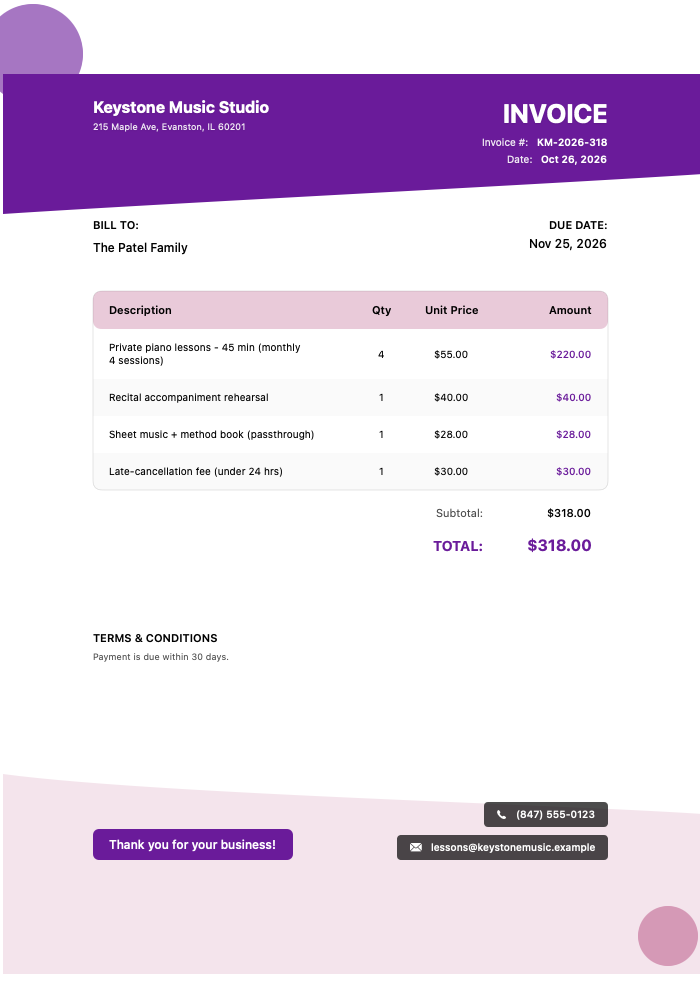
Here’s a music teacher invoice for a month of weekly 45-minute piano lessons with a recital accompanist share:
Click to view full size
This invoice does what a good lesson bill should:
- Lessons itemized by date — four 45-minute lessons through the month at $65 each — so the parent sees exactly what they’re paying for, no “how many lessons was it?” question
- The recital accompanist share as its own $58 line, clearly a shared expense and not part of the lesson rate
- The 24-hour cancellation policy printed on the invoice, so it’s never a surprise
- A clean $318.00 total for the billing period
Because every lesson is dated and the extras are separated, the parent can reconcile the invoice against their calendar in seconds.
Typical Private Music Lesson Rates
Lesson rates vary widely by instrument, teacher experience, location, and lesson length. These are typical US ranges — set yours against your local market and credentials.
| Lesson / Item | Typical Range | Unit |
|---|---|---|
| 30-minute private lesson | $25 – $50 | Per lesson |
| 45-minute private lesson | $40 – $75 | Per lesson |
| 60-minute private lesson | $50 – $100 | Per lesson |
| Monthly package (4 lessons) | $120 – $280 | Per month |
| 10-lesson package (discounted) | $350 – $800 | Per package |
| Recital / accompanist fee | $25 – $100 | Per student |
| Group / ensemble lesson | $15 – $35 | Per student |
| Travel to student’s home | $10 – $30 | Per visit |
Rates vary by instrument, teacher credentials, lesson length, and region. Advanced and specialized instruction commands higher rates. Packages are typically discounted against the per-lesson rate.
How Music Teachers Bill
Most private teachers settle into one of these rhythms:
Per lesson. You charge after each lesson or at the end of the week. Simplest to track, best for students who aren’t on a regular schedule, but it means more frequent small invoices.
Monthly in advance. You bill at the start of each month for that month’s lessons. Smooths your cash flow and reduces admin, but you need to state how many lessons the fee covers and how you handle a fifth-week month or a cancellation.
Packages. The student buys a block — often ten lessons at a small discount — and you draw down the balance as you go. Great for commitment and cash flow; the invoice should show lessons used and remaining so the parent knows when to rebuy.
Term-based. Common for teachers aligned to a school calendar: you bill per term for a set number of lessons. Clear and predictable, with make-up policies stated up front.
Whichever you use, consistency is what keeps parents paying without friction. A predictable invoice on a predictable day trains everyone to expect it — and pay it.
Getting Lessons Paid On Time
The nicest families still forget. The fix isn’t nagging — it’s a clean invoice that arrives on schedule and makes paying a two-tap job.
That’s where fast invoicing earns its keep. An app like InvoiceZap lets you build a professional lesson invoice in about 30 seconds — keep a reusable template per student with their rate, lesson length, and your cancellation policy already filled in, then drop in the month’s lesson dates and send.
Here’s the monthly rhythm with InvoiceZap: at the start of the month you open each student’s template, add the scheduled lesson dates, add any recital or sheet-music line, and send. As payments come in you mark each invoice paid, so you always know at a glance who’s settled and who’s behind — manual payment tracking, but organized, instead of a scroll through your banking app.
A few habits that keep lesson income flowing:
- Bill on the same day each month so families expect it
- State the cancellation policy on every invoice — it only works if it’s visible
- Itemize lessons by date so there’s nothing to dispute
- Show package balances so parents rebuy before they run out
- Send the invoice promptly — the longer the gap, the easier it is to forget
For related billing guidance, see our articles on invoice payment terms that get you paid faster, invoice follow-up email templates that work, and getting paid faster: 7 invoice timing strategies that work. To get started with a ready-made layout, browse the invoice templates collection.
Frequently Asked Questions
How should a music teacher charge — per lesson or monthly?
Both work; it depends on your students. Per-lesson billing is simplest for irregular schedules, while monthly-in-advance billing smooths your cash flow and cuts admin for regular students. If you bill monthly, state how many lessons the fee covers and how you handle five-week months or cancellations, so the amount never comes as a surprise.
How do I handle late cancellations?
Set a clear policy — commonly that lessons cancelled with less than 24 hours’ notice are charged in full — and print it on every invoice and sign-up agreement. Having it visible on each invoice the parent has already paid turns a potential argument into a simple reference, and it protects the lesson slot you held open.
Should I offer lesson packages?
Packages — such as ten lessons at a small discount — encourage commitment and give you cash up front, which steadies your income. On the invoice, show the lessons used and remaining so parents know when the package is running low and can rebuy before the gap, keeping the student’s schedule uninterrupted.
How do I bill for a recital?
Bill recital costs — accompanist fees, venue, sheet music — as separate itemized lines, often on their own invoice, rather than folding them into the lesson rate. Because these are shared expenses split across students, showing each family exactly what their share covers keeps the recital billing transparent and easy to collect.
What’s the easiest way to invoice music students each month?
Keep a reusable template per student holding their rate, lesson length, and cancellation policy, then add the month’s lesson dates and send. An app like InvoiceZap builds the invoice in about 30 seconds and lets you mark each one paid, so you can see who’s settled and who’s behind without digging through your bank statement.
The Takeaway
Private music teaching is a business made of many small payments, and it stays manageable only when the invoicing is clean. Itemize lessons by date, state your cancellation policy where parents can see it, keep package balances visible, and bill on a predictable schedule. Do that and the money runs quietly in the background, leaving you to do the part you actually signed up for — teaching.
Ready to make lesson billing a two-minute task? Try InvoiceZap free on your iPhone, iPad, or Mac. Build a professional lesson invoice in about 30 seconds, save a template per student, and track who’s paid at a glance. Download InvoiceZap and start your 3-day trial.
Ready to Streamline Your Invoicing?
Create professional invoices in 30 seconds with InvoiceZap's mobile-first design. No sign-up required.
Try InvoiceZap FreeTags: