
The repair is done. You’re wiping grease off your hands in someone’s driveway, the engine’s running clean, and the customer is happy — right up until the part where you have to tell them what they owe. You scribble a total on the back of a receipt, or worse, you say “I’ll text you the amount later,” and three days on you’re chasing a payment that’s gone cold.
Mobile mechanics live by the invoice. You don’t have a front desk or a service writer printing out a tidy work order — it’s just you, the car, and a bill you need to produce on the spot while the customer still has their wallet in reach. This guide covers a mobile mechanic invoice template that separates diagnostics, parts, and labor the way customers expect, the rates mobile techs actually charge, and how to hand someone a professional invoice before you’ve even packed up the toolbox.
Why Mobile Mechanic Billing Is Its Own Problem
A shop has structure working in its favor. There’s an estimate printed before work starts, a bay the car sits in until the bill is paid, and software that spits out a line-item invoice. On a driveway or a roadside, you have none of that. The leverage of “we’re holding your car” is gone the second the engine turns over.
That changes how you bill. A few things trip up mobile techs specifically:
The service call and the diagnosis are real charges. You drove out. You spent twenty minutes figuring out it was a failing alternator and not the battery. Customers who’ve only dealt with “free estimate” shops balk when that shows up on a bill — unless you put it on its own line and explain it up front. A mobile diagnostic fee is standard across the trade; hiding it inside the labor number just makes the labor number look insane.
Parts markup needs to be visible but defensible. You’re sourcing the part, warrantying it, and carrying the cost until the customer pays. A reasonable parts markup is normal. But when parts and labor are blended into one lump, a customer who Googles the part price online feels cheated. Itemize the part, itemize the labor to install it, and the math reads as fair.
You can’t easily “hold the work” for payment. Once the car’s fixed and running, your only protection against a slow-pay is a clear, professional invoice with payment terms on it. Due on receipt means due now — and a bill that looks legitimate gets paid on the spot far more often than a number texted later.
Roadside jobs add urgency and premium. A no-start in a parking lot at 7pm is not a scheduled brake job. Emergency and after-hours call-outs carry a premium, and that premium belongs on the invoice as its own labeled line so it reads as a surcharge, not a surprise.
You don’t need a shop management system for any of this. You need an invoice that breaks out the service call, parts, and labor — and that you can create on your phone before you leave the driveway.
What Belongs on a Mobile Mechanic Invoice
A good mobile mechanic invoice answers three questions instantly: what was wrong, what you did about it, and what each piece cost. Include:
- Your business name, phone, email, and license/certification (ASE certification or a state repair license builds trust fast)
- Customer name, the service address, and contact number
- Vehicle details — year, make, model, and mileage (critical for warranty and future reference)
- Invoice number and date (time too, for after-hours calls)
- Service call / mobile diagnostic fee as its own line
- Parts — each part itemized with quantity and price
- Labor — described plainly per task, with hours and rate
- After-hours or emergency surcharge on a separate labeled line when it applies
- Shop supplies and disposal fees (oil, rags, old-part disposal) if you charge them
- Subtotal, tax where your state taxes parts and labor, and total due
- Payment terms — usually due on receipt for mobile work
- Payment instructions as plain text: card, bank transfer, Venmo, Zelle, check
- A warranty note — “90-day warranty on parts and labor” reassures and protects you
The vehicle details line matters more than it looks. It ties the invoice to a specific car and mileage, which is your record if the customer comes back in two months claiming the same part failed.
Sample Invoice: Driveway Brake & Belt Job
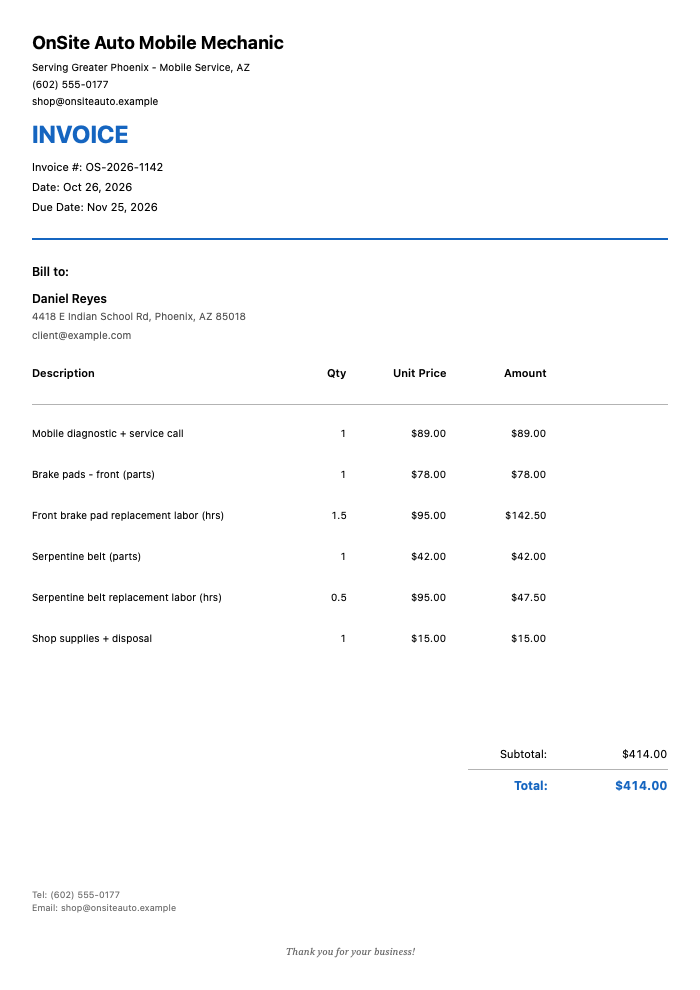
Here’s a clean mobile mechanic invoice for a scheduled driveway visit — front brakes plus a serpentine belt the customer approved once you were there:
Click to view full size
This invoice shows exactly the structure that keeps driveway billing clean:
- The $89 mobile diagnostic + service call as its own line, so the customer sees what the trip and inspection cost
- Parts itemized separately from labor — brake pads at $78, belt at $42 — so the pricing is traceable against anything they’d look up
- Labor broken out by task — 1.5 hours on the brakes, half an hour on the belt, at a clear $95/hour rate
- Shop supplies + disposal on its own small line, for a $414.00 total due on receipt
Nothing is bundled into a mystery number. The customer can follow every dollar, which is exactly why this kind of invoice gets paid before you leave.
Typical Mobile Mechanic Rates
Mobile rates run a little higher than a brick-and-mortar shop’s base labor rate because you’re absorbing travel, fuel, and the convenience the customer is paying for. These are typical US ranges — always check what your local market supports.
| Service | Typical Range | Unit |
|---|---|---|
| Mobile diagnostic / service call | $75 – $120 | Per visit |
| Standard labor rate | $80 – $130 | Per hour |
| After-hours / emergency call-out | $100 – $200 | Premium per visit |
| Brake pad replacement (per axle) | $150 – $300 | Parts + labor |
| Alternator replacement | $300 – $600 | Parts + labor |
| Starter replacement | $250 – $500 | Parts + labor |
| Battery replacement | $120 – $250 | Parts + labor |
| Oil change (mobile) | $70 – $120 | Per service |
| Serpentine belt | $90 – $200 | Parts + labor |
| Pre-purchase inspection | $100 – $200 | Per vehicle |
Rates vary by region, vehicle, and part sourcing. Luxury and European vehicles command higher labor. Always confirm local prevailing rates.
How Mobile Mechanics Bill
Most mobile techs settle into one of a few billing models depending on the job:
Parts-plus-labor (the standard). You charge for the part, then charge labor to install it, usually at an hourly rate or a flat “book time” per job. This is the clearest model for the customer and the easiest to defend line by line.
Flat-rate jobs. For common repairs — brake jobs, alternator swaps, oil changes — many mobile mechanics quote a single all-in price. It’s cleaner for the customer and protects you if the job runs long. Internally you’re still thinking parts + labor, but the invoice shows one number plus the diagnostic.
Diagnostic-first. For a no-start or an intermittent fault, charge the diagnostic as a committed fee, then quote the repair separately once you know what’s wrong. Make clear up front whether the diagnostic fee rolls into the repair if they proceed — customers remember that promise.
Fleet / recurring. If you service a small fleet or a used-car lot, you’re into monthly billing and net terms. That’s a different invoice: PO numbers, net-15 or net-30, and a running relationship rather than pay-on-the-spot.
Whichever model you use, the invoice needs to make the logic visible. A customer who understands why they’re paying what they’re paying almost never disputes it.
Getting Paid on the Spot
The single biggest advantage you have as a mobile mechanic is proximity: you’re standing next to the customer when the work is done. Use it. The invoice you hand over in the driveway gets paid far more reliably than one you send that evening.
That’s where creating the invoice on your phone beats writing it up later. Modern invoice apps like InvoiceZap let you build a professional, itemized invoice on-site in about 30 seconds — pick your template, drop in the parts and labor, add the diagnostic fee, and show the customer the total right there on the screen.
Here’s how it works in practice with InvoiceZap: you save a reusable template with your business details, ASE certification, and standard payment instructions, so every job starts half-built. On-site you add the vehicle, the parts, and the labor lines, and the app totals it instantly — including that after-hours surcharge if the job earned one. You show the customer the invoice, they pay by whatever method you’ve listed, and you mark it paid before you pull out of the driveway.
A few habits that get mobile mechanics paid faster:
- Quote the diagnostic before you drive out so the trip fee is never a surprise
- Show the invoice on-screen before they pay — transparency closes the payment
- List multiple payment methods (Venmo, Zelle, card, check) so there’s no “I’ll have to go to an ATM”
- Add your warranty terms to the invoice — it reassures the customer and documents your coverage window
- Mark it paid immediately so you’re not chasing your own memory a week later
Ready to create your mobile mechanic invoice? Check out our mechanic invoice template guide for shop-side billing, and our rundown of field service mobile invoicing for getting paid faster on-site. For contractor-style trade billing, see the handyman invoice template. For a ready-made starting layout, browse the maintenance invoice templates collection.
Frequently Asked Questions
How much should a mobile mechanic charge for a service call?
Most mobile mechanics charge a $75–$120 service call or mobile diagnostic fee that covers travel and the initial inspection. Quote it before you drive out, and decide in advance whether it rolls into the repair cost if the customer approves the work. Putting it on its own invoice line keeps it from looking like padding.
Should I itemize parts and labor separately?
Yes. Blending parts and labor into one number invites disputes, because customers can look up part prices online and feel overcharged. Listing the part with its price and the labor to install it separately makes your pricing transparent and far easier to defend at the driveway.
How do I get paid before I leave the job?
Create the invoice on your phone while you’re still on-site, show the customer the total on screen, and list several payment methods — card, bank transfer, Venmo, Zelle, check. An app like InvoiceZap builds a professional itemized invoice in about 30 seconds, so there’s no “I’ll send it later” gap where payment goes cold.
Do mobile mechanics charge more than shops?
Usually a little, yes. Mobile labor rates run somewhat higher than a shop’s base rate because you’re absorbing travel, fuel, and the convenience of coming to the customer. Customers generally accept this when the invoice clearly shows the service call as a separate, reasonable line.
What should be on a mobile mechanic invoice for warranty purposes?
Include the vehicle’s year, make, model, and mileage, the specific parts installed with their prices, the labor performed, and your warranty terms (for example, “90-day warranty on parts and labor”). This ties the invoice to a specific repair on a specific vehicle, which protects you if the customer returns with a claim later.
The Takeaway
Mobile mechanics get paid on trust and transparency. The invoice is where both show up — separate the service call, itemize parts and labor, label any after-hours premium, and hand it over before you leave the driveway. Do that and you’ll chase far fewer payments.
Ready to stop writing totals on the back of receipts? Try InvoiceZap free on your iPhone, iPad, or Mac. Build a professional, itemized mobile mechanic invoice in about 30 seconds, show the customer right there on-site, and get paid before you pack up. Download InvoiceZap and start your 3-day trial.
Ready to Streamline Your Invoicing?
Create professional invoices in 30 seconds with InvoiceZap's mobile-first design. No sign-up required.
Try InvoiceZap FreeTags: