The client called Monday morning: email was down, everyone was panicking, and could you fix it “real quick”? Three hours, a misconfigured DNS record, and one very relieved office later, you’re back at your desk wondering how to bill it. Was that covered under their support agreement? Emergency rate? And while you were in there, you noticed their backups hadn’t run in two weeks and fixed that too — which nobody asked for, but which just saved them from disaster. How do you charge for the thing that mattered most?
IT consulting billing is a puzzle because your work ranges from planned projects to 2am emergencies to invisible maintenance that only gets noticed when it’s absent. This guide covers an IT consultant invoice template that handles hourly work, fixed-bid projects, and managed-services retainers, the rates consultants actually charge, and how to bill in a way that captures your value instead of just your hours.
Why IT Consulting Billing Gets Complicated
Most consultants bill their time and move on. IT consultants deal with several fundamentally different kinds of work, often for the same client in the same month.
Reactive and proactive work bill differently. Fixing the outage is reactive — visible, urgent, easy to bill. Patching the server that would have caused next month’s outage is proactive — invisible, easy to skip, and the most valuable thing you do. If your billing only rewards firefighting, you’re incentivized to let fires start. Managed-services models exist precisely to fix this.
Emergency and after-hours work needs its own rate. A production system down at midnight is not a scheduled Tuesday task. After-hours and emergency rates are standard and fair, but they have to be agreed in advance and shown clearly on the invoice, or the client feels blindsided by a bill that’s double what they expected.
Projects and support are different money. A network migration is a scoped project with a fixed or estimated price. Ongoing “keep the lights on” support is a retainer or hourly arrangement. Blur them together and neither you nor the client can tell whether the project ran over or the support is bleeding hours.
Value and hours don’t match. The DNS fix that took twenty minutes might have saved the client thousands in lost productivity. Pure hourly billing punishes your expertise — the better you are, the less you earn per problem. This is why experienced consultants move toward fixed-bid projects and value-based retainers, where the invoice reflects the outcome, not the clock.
You don’t need enterprise PSA software to bill a solo or small IT practice well. You need an invoice that separates project, support, and emergency work, and that captures the proactive fixes you’d otherwise give away.
What Belongs on an IT Consultant Invoice
A professional IT invoice answers what you did, what it cost, and how to pay — and documents the work for a client who wasn’t watching over your shoulder. Include:
- Your business name and contact (and business/tax number)
- Client business name and contact
- Invoice number and issue date
- Service period or project name — “October managed services” or “Network migration, Phase 1”
- Itemized lines: support hours, project milestones, emergency work, hardware/software, each described plainly
- Ticket or work references where relevant — clients love traceability
- Subtotal, tax where it applies, and total due
- Payment terms (net 15, net 30) and payment instructions as plain text: bank transfer, ACH, card
- A summary note — what you did and, importantly, what you caught proactively
That proactive note earns its space. “Also detected and repaired a failed backup job before data loss occurred” tells the client, in one line, that your invisible work is the reason nothing bad happened. It’s how you justify a retainer that looks like you’re being paid for quiet months.
Sample Line Items: Managed Services + Emergency
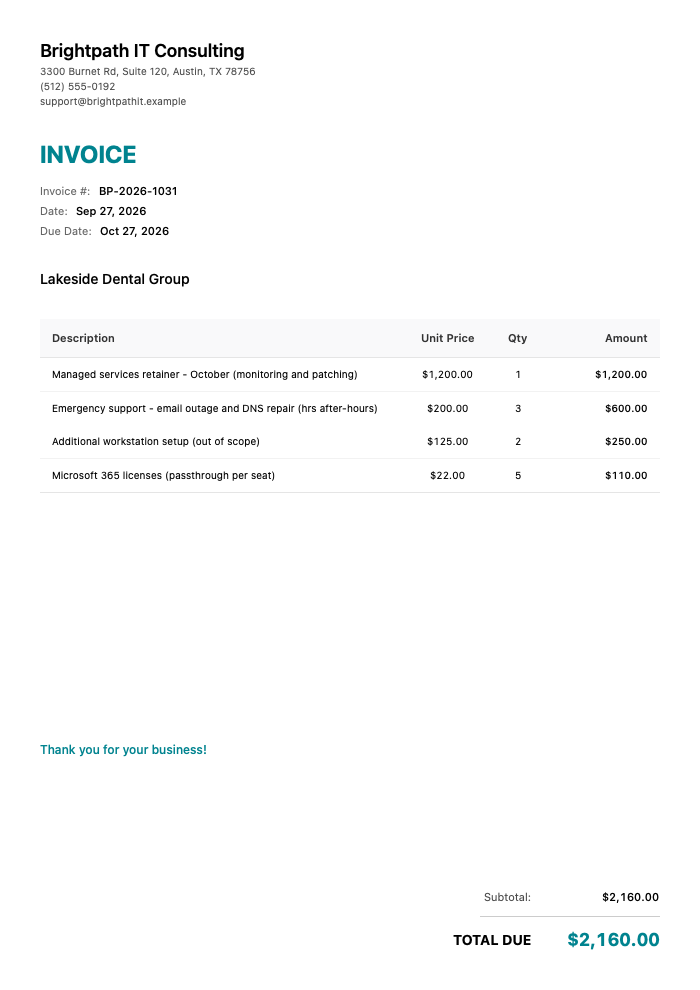
Here’s a clean invoice for a managed-services client who also had an after-hours incident:
Click to view full size
This invoice shows:
- The $1,200 October managed services retainer (monitoring, patching, support)
- 3 hours of after-hours emergency support for an email outage and DNS repair at $200/hr ($600)
- Two out-of-scope workstation setups at $125 each ($250)
- Five Microsoft 365 license seats passed through at $22 each ($110), for a total of $2,160.00
The retainer covers the routine. The after-hours emergency is its own clearly labeled line at the agreed emergency rate. The extra workstations are tagged out-of-scope, and the licenses are a transparent passthrough. The client can trace every dollar.
Typical IT Consulting Rates
Rates vary hugely by specialization, region, and client size. Security, cloud architecture, and niche expertise command more. Treat these as a starting sketch.
| Service | Typical Rate | Unit |
|---|---|---|
| General IT support (hourly) | $75–$200 | Per hour |
| Senior / specialist consulting | $150–$350 | Per hour |
| Emergency / after-hours | $200–$450 | Per hour |
| Managed services (per user) | $75–$200 | Per user/month |
| Managed services (flat retainer) | $500–$5,000+ | Per month |
| Project work (fixed bid) | $1,000–$50,000+ | Per project |
| Network / cloud migration | $2,000–$25,000 | Per project |
| Security assessment / audit | $1,500–$10,000 | Per engagement |
| Help desk (per ticket) | $25–$75 | Per ticket |
| Hardware / software | Cost or cost+markup | Passthrough |
A note on managed services per-user pricing: it scales cleanly with the client’s headcount and turns unpredictable support into predictable revenue for you and a predictable line item for them. It’s why the industry has moved this direction.
Three Ways to Bill IT Work
Most consultants use all three, often for the same client.
Hourly. You bill for time, best for ad-hoc support, small clients, or work where the scope genuinely can’t be predicted. Simple and fair, but it caps your income at your hours and quietly penalizes expertise — solve it fast and you earn less. Use it as an entry point and for genuine one-offs, and log time as you go so nothing slips.
Fixed-bid project. You quote a set price for a defined scope — a migration, a rollout, an audit. Clients love the certainty, and it rewards you for efficiency and experience rather than slowness. The risk is underscoping, so define deliverables and boundaries tightly, and bill anything outside them as a clear change-order line.
Managed services / retainer. The client pays a fixed monthly fee — flat or per-user — for ongoing monitoring, maintenance, and support. This is the mature model: predictable revenue for you, predictable cost for them, and crucially it aligns your incentives with prevention rather than firefighting. Define what’s included, cap or meter what isn’t, and bill emergencies and projects on top.
Quick gut check: unpredictable one-offs lean hourly, defined deliverables lean fixed-bid, and ongoing relationships belong on managed-services retainers. Before you set net-30 terms with a new business client, these payment terms are worth a read so your cash flow doesn’t depend on their accounts-payable mood.
Billing Without the Admin Drag
Here’s the friction: IT consultants are often solo or small, doing the sales, the work, and the billing. Reconstructing a month of tickets, project hours, and that after-hours emergency into a clean invoice is exactly the kind of admin that gets pushed to Friday night and then to next week — and every delayed invoice is delayed cash.
This is where InvoiceZap helps a lean practice. It’s built to send a professional, itemized invoice from your phone or laptop in about 30 seconds — so billing a client after a job or at month-end is a quick task, not a dreaded one. You save each client, pick a template, drop in your support, project, and emergency lines, and your payment details ride along automatically. It’s mobile-first, so you can invoice an emergency call the moment you’ve closed the ticket, while the client’s gratitude is fresh, and you mark invoices paid yourself as money lands so you always know which projects and retainers are still open. There’s a 3-day full trial to test it against your own workflow.
Invoicing promptly — especially emergency work, right after you fix the crisis — also gets you paid faster, because you’re billing at peak goodwill. If a client stretches their terms, keep a couple of follow-up email templates ready so the nudge is quick and professional. And if you want to compare tools freelancers and consultants use, this rundown of invoicing software for freelancers is a useful reference; for a structured layout built for consulting work, the IT consulting invoice template maps directly to how you bill.
Wrapping Up
Your value as an IT consultant is keeping things running and stopping problems before they start — but that value is invisible unless your invoice makes it visible. Separate project, support, and emergency work, agree emergency rates in advance, note the proactive fixes you’d otherwise give away, and move steady clients toward retainers that reward prevention. Build the template once, match the model to the work, and get paid for your expertise instead of just your clock.
When you’re ready to stop dreading the monthly billing run, download InvoiceZap and send your next invoice in about 30 seconds. Start the 3-day trial, bill your next emergency call the moment it’s fixed, and keep your receivables running as smoothly as your clients’ systems.
Frequently Asked Questions
Should IT consultants charge hourly or a fixed retainer?
It depends on the work. Hourly suits ad-hoc support and genuinely unpredictable scopes, but it caps your income and penalizes efficiency. Managed-services retainers, flat or per-user, are the mature model because they give predictable revenue and align your incentives with preventing problems rather than just fixing them. Many consultants use hourly for one-offs and retainers for ongoing clients.
How do I bill for emergency or after-hours IT support?
Agree an emergency or after-hours rate in advance, then show it as its own clearly labeled line on the invoice, separate from routine support. This keeps the higher charge transparent and defensible instead of coming as a shock. Emergency rates commonly run well above standard hourly because of the urgency and schedule disruption.
How much should an IT consultant charge per hour?
General IT support commonly runs $75 to $200 per hour, with senior or specialist consulting reaching $150 to $350 and emergency work higher still. Specializations like security and cloud architecture command premiums. As you gain experience, shifting toward fixed-bid projects and retainers lets you bill for outcomes rather than being capped by your hourly rate.
How should I bill proactive maintenance clients don’t see?
Fold it into a managed-services retainer so you’re paid for prevention, not just firefighting, and note the proactive work on the invoice, for example “detected and repaired a failed backup before data loss.” That one line makes your invisible value visible and justifies a retainer that looks like payment for quiet months.
What’s the fastest way to invoice IT consulting work?
Save each client and use a template so you’re not rebuilding invoices from scratch, and send from your phone right after closing a ticket or completing a milestone. A mobile app that pre-fills your details and payment instructions cuts each invoice to about 30 seconds, gets emergency work billed at peak goodwill, and keeps delayed cash from piling up.
Ready to Streamline Your Invoicing?
Create professional invoices in 30 seconds with InvoiceZap's mobile-first design. No sign-up required.
Try InvoiceZap FreeTags: