You’ve done the work, the client’s happy, and now you need to get paid. You open a blank document and hit the first real question of self-employment: what exactly has to go on this thing? Do you need a VAT number? What’s an invoice number supposed to look like? Can you just put your name, or do you need a registered company? For a lot of UK sole traders, the invoice is the first genuinely official-feeling document they produce — and getting it right matters both for getting paid and for keeping HMRC happy at tax time.
The good news: invoicing as a sole trader in the UK is simpler than it looks. You don’t need a limited company, you usually don’t need VAT, and the legal must-haves fit on a short list. This guide walks through exactly what a sole trader invoice needs, when VAT enters the picture, how to number and store your invoices, and how to send a clean, professional one in about 30 seconds.
Sole Trader vs Limited Company: Your Invoice Is Fine
First, a reassurance. As a sole trader you are legally self-employed as an individual — you are the business. You do not need to register a limited company to invoice clients, and you do not need “Ltd” anywhere. You can trade and invoice under your own name (Jane Smith) or under a business name (Jane Smith Design), and either is completely legitimate.
That means the intimidating bits that apply to limited companies — company registration numbers, Companies House details — simply don’t apply to you. Your invoice is a straightforward document from a self-employed person to a client. What it does need is enough detail to be professional, to get you paid, and to stand up as a record if HMRC ever asks.
What a UK Sole Trader Invoice Must Include
There’s no single government-mandated invoice template, but a proper invoice — and one that keeps your records clean for Self Assessment — should carry all of the following:
- A unique invoice number — sequential and never repeated (more on this below)
- Your name and, if you use one, your trading/business name
- Your contact details — address and email, so the client (and you) have a record
- The client’s name and address
- The date the invoice is issued (the “invoice date”)
- A clear description of the goods or services supplied
- The amount(s) charged — per line and as a total
- The total amount due, in pounds sterling
- Payment terms — when it’s due (e.g. “payment due within 14 days”) and how to pay (your bank name, sort code, and account number for a transfer)
If you’re VAT registered, you must add more — see the next section. If you’re not VAT registered, do not show a VAT number or charge VAT; simply list your prices and total.
Here’s what that looks like in practice for a sole trader who isn’t VAT registered — a trading name, a sequential number, clear line items, and a total in pounds with no VAT line:
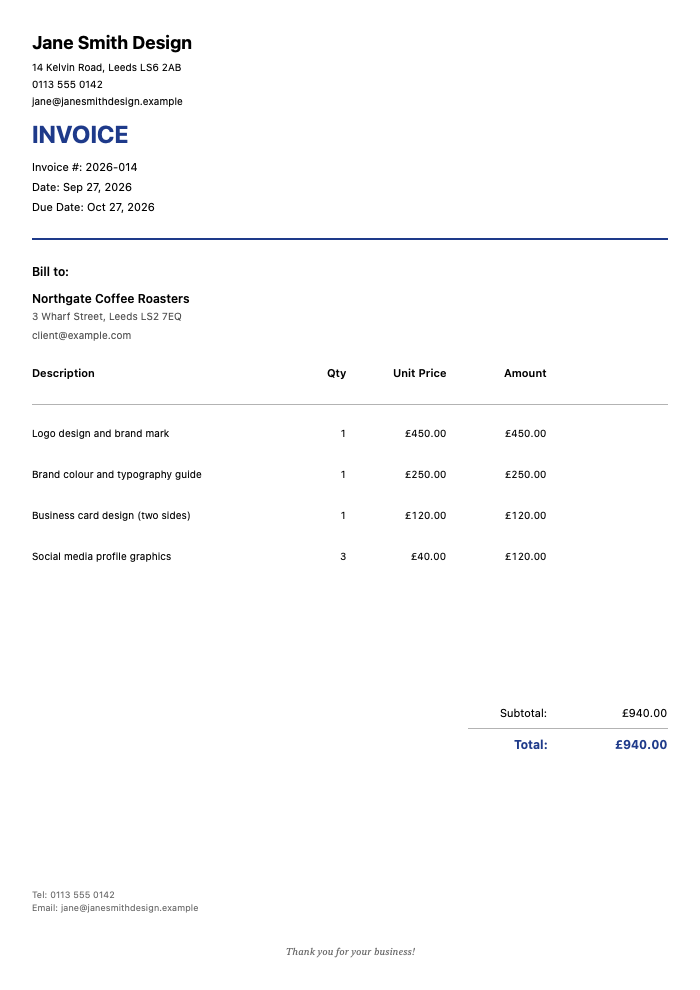
Click to view full size
A couple of good-practice extras that aren’t strictly required but make life easier: a purchase-order reference if the client gave you one, and your Unique Taxpayer Reference is not needed on invoices (that’s for your own HMRC dealings, not the client’s). Keep it clean and professional and you’re covered.
Do You Need to Put VAT on Your Invoice?
For most new and small sole traders, the answer is no. You only charge VAT if you’re VAT registered. You’re required to register once your VAT-taxable turnover crosses the HMRC registration threshold in a rolling 12-month period, and you can register voluntarily below it if it suits your business. If your turnover is under the threshold and you haven’t registered voluntarily, you neither charge VAT nor show a VAT number — your invoice simply shows your prices.
If you are VAT registered, your invoices become “VAT invoices” and must additionally include:
- Your VAT registration number
- The rate of VAT applied to each item
- The VAT amount shown separately
- The price excluding VAT and the total including VAT
VAT registration also brings ongoing filing obligations to HMRC under Making Tax Digital, using compatible software. InvoiceZap is not accounting or tax-filing software — it doesn’t submit VAT returns, connect to HMRC, or handle Making Tax Digital filing. It’s a tool for creating clean, professional invoices quickly. If you’re VAT registered, you’ll still use dedicated VAT-filing software or an accountant for the returns themselves, and you can produce your VAT invoices for clients here. If you’re not sure whether you should register, that’s a question for HMRC’s guidance or an accountant — not one to guess at.
Numbering, Records, and Getting the Details Right
Invoice numbers must be unique and sequential. This isn’t bureaucratic fussiness — it’s how you (and HMRC) keep track. Pick a simple system and never break it. 001, 002, 003 works. 2026-001, 2026-002 works and resets cleanly each year. Some sole traders prefix a client code. Whatever you choose, never reuse a number and never skip backwards, because a gap or a duplicate is the kind of thing that raises an eyebrow in a records check.
Keep every invoice for your records. As a self-employed person you must keep your business records — including copies of invoices you’ve issued — to complete your Self Assessment tax return, and HMRC requires you to retain them for at least the period they specify. Store them somewhere you won’t lose them: a dedicated folder, cloud storage, or an app that keeps your invoice history in one place. Come January, when Self Assessment looms, a tidy trail of numbered invoices turns a stressful evening into a quick one.
Get paid on time by being clear. State your payment terms plainly — a due date and how to pay. Fourteen days is common for sole traders; some use 30. Whatever you choose, these payment terms are worth a look so you set expectations that actually protect your cash flow rather than leaving “due on receipt” to interpretation. Late payment is the perennial sole-trader headache, and clear terms plus a prompt invoice are your best defence.
Quick gut check before you send: unique number, your name (and trading name), client details, clear description, total in pounds, payment terms and bank details, and VAT details only if you’re registered. That’s a compliant, professional UK sole trader invoice.
Sending It Without the Faff
Here’s the reality: as a sole trader you’re the whole business — the work, the sales, the emails, and the invoicing. Wrestling a blank document into a professional invoice, remembering to increment the number, and typing your bank details in yet again is exactly the admin that gets left until Sunday night and then delays your own pay.
This is where InvoiceZap earns its place for a UK sole trader. It’s built to send a professional, correctly structured invoice from your phone or laptop in about 30 seconds — with your name, trading name, and bank details already filled in, so every invoice is consistent and you’re not retyping them. You save each client, pick a template, add your lines, and send. It handles sterling and lets you set your own terms and numbering, it’s mobile-first so you can invoice a client the moment a job’s done, and you mark invoices paid yourself as the money lands so you always know what’s outstanding heading into tax season. There’s a 3-day full trial to try it against your own work.
Two honest caveats so you know what you’re getting: InvoiceZap is an invoicing tool, not accounting or VAT-filing software. It won’t file your Self Assessment or submit VAT returns to HMRC — for those you’ll use HMRC’s tools, dedicated tax software, or an accountant. What it does is take the friction out of producing and sending the invoices themselves, and keeping a tidy, numbered history you can refer back to.
Sending promptly is half the battle with late payers — the sooner and more professionally you invoice, the sooner you’re paid. If a client drags their feet, keep a couple of follow-up email templates ready so the chase is polite and quick. For layouts that fit common freelance work, browse the freelance and consulting invoice templates or, if you’re a writer, the writing services invoice template.
Wrapping Up
Invoicing as a UK sole trader is genuinely simpler than the first blank page makes it feel. You don’t need a limited company, you only touch VAT if you’re registered, and the must-haves are a short, memorable list: a unique number, your details, the client’s, a clear description, the total in pounds, and clear payment terms. Number sequentially, keep every copy for Self Assessment, send promptly, and you’ve turned invoicing from a Sunday-night dread into a 30-second task.
When you want that task off your plate, download InvoiceZap and send your next sole trader invoice in about 30 seconds. Start the 3-day trial, invoice your next client the moment the work’s done, and keep a tidy numbered trail ready for tax time — while leaving the actual filing to your accountant or HMRC’s tools, where it belongs.
Frequently Asked Questions
Do I need a limited company to invoice as a sole trader in the UK?
No. As a sole trader you’re self-employed as an individual and you are the business, so you can invoice clients under your own name or a trading name without registering a limited company. You don’t need a company registration number or “Ltd” anywhere. Your invoice just needs the standard details: a unique number, your and the client’s details, a description, the total in pounds, and payment terms.
Do sole traders have to charge VAT on invoices?
Only if you’re VAT registered. You must register once your VAT-taxable turnover crosses HMRC’s registration threshold over a rolling 12 months, and you can register voluntarily below it. If you’re not registered, you don’t charge VAT or show a VAT number — you just list your prices. If you are registered, your invoices must show your VAT number, the VAT rate and amount, and the totals excluding and including VAT.
What information must a UK sole trader invoice include?
A unique sequential invoice number, your name and any trading name, your contact details, the client’s name and address, the invoice date, a clear description of what you supplied, the amounts and total in pounds sterling, and your payment terms and bank details. If you’re VAT registered you must also add your VAT number, the rate and amount of VAT, and the totals before and after VAT.
How should I number my sole trader invoices?
Use a simple sequential system and never break it — for example 001, 002, 003, or 2026-001, 2026-002 resetting each year. Every number must be unique and you should never reuse one or skip backwards, because gaps or duplicates cause problems in a records check. Using invoicing software that increments the number automatically removes the risk of mistakes.
Can InvoiceZap file my Self Assessment or VAT returns?
No. InvoiceZap is an invoicing tool for creating and sending professional invoices quickly and keeping a tidy history — it is not accounting or tax-filing software and does not submit Self Assessment or VAT returns to HMRC. For filing you’ll use HMRC’s own tools, dedicated tax software, or an accountant. InvoiceZap handles the invoices themselves and the record of what you’ve billed.
Ready to Streamline Your Invoicing?
Create professional invoices in 30 seconds with InvoiceZap's mobile-first design. No sign-up required.
Try InvoiceZap FreeTags: